Table Of Content1
Designing in-vehicle gestural interfaces
- Minimising visual distraction
Master of Science Thesis
DAVID ANDERSSON
FRIDA WIKANDER
Department of Applied IT
Interaction Design and Technologies
CHALMERS UNIVERSITY OF TECHNOLOGY
Gothenburg, Sweden, 2013
Report No. 2013:097
ISSN 1651-4769
REPORT NO. 2013:097
Designing in-vehicle gestural interfaces
- Minimising visual distraction
DAVID ANDERSSON
FRIDA WIKANDER
Department of Applied IT
CHALMERS UNIVERSITY OF TECHNOLOGY
Göteborg, Sweden 2013
Designing in-vehicle gestural interfaces
- Minimising visual distraction
DAVID ANDERSSON
FRIDA WIKANDER
© DAVID ANDERSSON & FRIDA WIKANDER, 2013
Master thesis at Chalmers University of Technology
In cooperation with Semcon
Report No. 2013:097
ISSN 1651-4769
Department of Applied IT
Chalmers University of Technology
SE-412 96 Gothenburg
Sweden
Telephone +46 (0)31-772 10 00
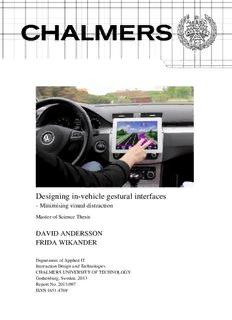
Cover:
The prototyped gesture system, placed inside a vehicle.
Photo by: David Andersson
Department of Applied Information Technology
, Sweden 2013
ABSTRACT
The vehicle industry of today is always striving to introduce new innovations and new
concepts are being presented by the week. The eager to always be the leading manufacturer
within technology and infotainment may sometimes affect safety. This master thesis aimed to
utilise gestural interfaces in order to minimise visual distraction when using in-vehicle
infotainment systems. This is especially important due to touchscreens’ lack of tactility.
The design process of the thesis has had a human-centered approach and involved potential
users in each iteration, assu ha h us s’ c nc p i n and m n al m d l was ak n in
consideration when design concepts were developed. During the project, a questionnaire
regarding fast access to controls in a vehicle was used as a foundation.
The process included a number of iterations to find an intuitive mapping between gestures and
features in a vehicle and resulted in two concepts, which both were evaluated further. One of
the two concepts was later considered the more promising one to continue development and
testing with and was named GABI (Gesture Action Based Infotainment). The concept
incorporated an underlying pattern to achieve inner logic and coherency, and thus simplify for
users to learn and remember.
The GABI prototype was lastly evaluated in a driving context, measuring learnability and
experienced workload. Findings from the driving test indicated that the participants were able
to learn the system with reasonably few iterations and were generally positive towards using
the system.
Conclusions from this thesis were that designs using gestures should conform to conventions
whenever it is possible to do so. By providing an inner logic, users will learn the system faster
and facilitate to make sense of the complex.
Having done initial acceptance tests for GABI, more tests are necessary, to measure and
compare the distraction and ensure safe interaction for the driver.
Keywords: gestures, interface, visual distraction, infotainment, HCD, interaction, HMI,
touchscreen, vehicle
ACKNOWLEDGEMENT
This work was carried out as a master thesis at the Interaction Design and Technology
Program at Chalmers University of Technology in cooperation with Semcon.
First, we would like to thank Anders Sundin, the initiator of this project at Semcon, who gave
us the opportunity to pursue the idea with touch and gestures.
We would also like to thank our two supervisors, Sara Nilsson at Semcon and Sus Lundgren
at Chalmers, for being a great support during the whole project.
We would also like to thank all the participants in our user studies and evaluations, without
you this work would not have been possible.
Finally, we would also like to thank our friend, Peter, for your patience and delicate work
when proofreading this thesis, it would not be half as good without you.
Göteborg, July 2013
David Andersson and Frida Wikander
Table of contents
1 Introduction ......................................................................................................................... 1
1.1 Focus of thesis ............................................................................................................... 1
1.1.1 Research Questions ................................................................................................. 2
1.2 Delimitations ................................................................................................................. 2
1.3 Stakeholders .................................................................................................................. 2
1.4 About Semcon ............................................................................................................... 3
2 Theory ................................................................................................................................... 4
2.1 Interaction design ......................................................................................................... 4
2.2 Gestural Interfaces ....................................................................................................... 4
2.2.1 Attributes of gestures ............................................................................................... 8
2.2.2 Choosing gestures .................................................................................................. 10
2.2.3 Metaphors and idioms in gestures ......................................................................... 10
2.3 Gestures in smart devices .......................................................................................... 11
2.4 Driver Distraction ....................................................................................................... 13
2.5 Existing guidelines ...................................................................................................... 15
3 Methodology ....................................................................................................................... 17
3.1 Human-centred design ............................................................................................... 17
3.2 Literature study .......................................................................................................... 17
3.3 Benchmarking ............................................................................................................. 17
3.4 Interviews .................................................................................................................... 17
3.5 Questionnaire .............................................................................................................. 18
3.6 Think aloud ................................................................................................................. 18
3.7 Skewing ........................................................................................................................ 18
3.8 SCAMPER .................................................................................................................. 19
3.9 Workshop .................................................................................................................... 19
3.10 Extreme characters .................................................................................................... 20
3.11 Stating the objectives .................................................................................................. 20
3.12 Prototyping .................................................................................................................. 20
3.13 Wizard of Oz ............................................................................................................... 21
3.14 Heuristic evaluation.................................................................................................... 21
3.15 Expert evaluation........................................................................................................ 22
3.16 NASA Task Load Index (NASA-TLX) ..................................................................... 22
4 Process ................................................................................................................................ 23
4.1 Initial process plan ..................................................................................................... 23
4.2 Re-focus and continuation ......................................................................................... 24
4.3 Choice of methods....................................................................................................... 25
4.4 Benchmarking ............................................................................................................. 27
4.4.1 Results ................................................................................................................... 28
4.4.2 Analysis ................................................................................................................. 29
4.5 SCAMPER .................................................................................................................. 29
4.5.1 Results ................................................................................................................... 30
4.5.2 Analysis ................................................................................................................. 30
4.6 Skewing ........................................................................................................................ 30
4.6.1 Results ................................................................................................................... 31
4.6.2 Analysis ................................................................................................................. 32
4.7 Workshop .................................................................................................................... 32
4.7.1 Analysis ................................................................................................................. 33
4.8 Stating the objectives .................................................................................................. 34
4.9 Questionnaire about importance of the feature controls in the car ....................... 34
4.9.1 Results ................................................................................................................... 35
4.9.2 Analysis ................................................................................................................. 35
4.10 Gesture mapping ........................................................................................................ 36
4.10.1 First iteration ......................................................................................................... 36
4.10.2 Second iteration ..................................................................................................... 40
4.10.3 Concept development ............................................................................................ 44
4.10.4 Third iteration ........................................................................................................ 45
4.11 Expert evaluation........................................................................................................ 52
4.11.1 First session - Users' concept ................................................................................ 53
4.11.2 Second session - D si n s’ c nc p ..................................................................... 54
4.11.3 Conclusion – Expert evaluation ............................................................................ 55
4.12 Evaluation of final prototype ..................................................................................... 55
4.12.1 Learning the system ............................................................................................... 56
4.12.2 User experience ..................................................................................................... 56
4.12.3 Results ................................................................................................................... 57
4.12.4 Analysis ................................................................................................................. 60
5 Final Result ........................................................................................................................ 63
5.1 Interactive prototype .................................................................................................. 63
5.2 Design guidelines ........................................................................................................ 65
5.2.1 Whenever possible, use already known conventions ............................................ 65
5.2.2 Do not just invent new gestures - ask the users first ............................................. 65
5.2.3 Make the touch area big enough ............................................................................ 65
5.2.4 Use patterns ........................................................................................................... 66
5.2.5 Often used features should have simpler gestures ................................................. 66
5.2.6 Make a clear distinction between gestures and be flexible ................................... 67
5.2.7 Offer an easy way to undo ..................................................................................... 67
5.2.8 Do not use too many gestures ................................................................................ 67
5.2.9 Support multiple levels of expertise by providing multiple alternatives ............... 68
5.2.10 Make use of different levels of complexity and allow the user to develop into an
advanced user ................................................................................................................... 68
5.2.11 Allow customisation .............................................................................................. 68
6 Discussion ........................................................................................................................... 69
6.1 Process Discussion ...................................................................................................... 69
6.2 Result Discussion ........................................................................................................ 70
6.3 Touch vs. Free-form gestures .................................................................................... 72
6.4 Future Work ............................................................................................................... 73
7 Conclusion .......................................................................................................................... 73
References ............................................................................................................................... 75
Appendix I BENCHMARKING
Appendix II EXISTING GUIDELINES
Appendix III SCAMPER
Appendix IV SKEWING
Appendix V SURVEY ABOUT IMPORTANCE OF THE FEATURE CONTROLS IN
THE CAR
Appendix VI WORKSHOP
Appendix VII GESTURE MAPPING
Appendix VIII EVALUATION OF FINAL PROTOTYPE
ABBREVIATIONS
AAM - Alliance of Automotive Manufacturers
EC - Commission of the European Communities
GABI - Gesture Action Based Infotainment
HCD - Human-Centered Design
HCI - Human Computer Interaction
HMI - Human-Machine Interface
JAMA - Japan Automobile Manufacturers Association
NASA-TLX - NASA Task Load Index
NHTSA - National Highway Traffic Security Agency
NUI - Natural User Interfaces
SGD - Single Glance Duration
TGT - Total Glance Time
WP - Windows Phone
Description:Designing in-vehicle gestural interfaces. - Minimising visual distraction. Master of
Science Thesis. DAVID ANDERSSON. FRIDA WIKANDER. Department of