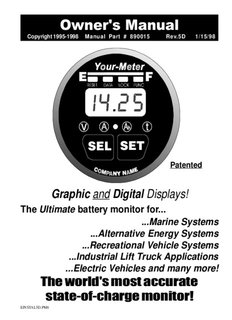
Table Of ContentOwner’s Manual
Copyright 1995-1998 Manual Part # 890015 Rev.5D 1/15/98
Patented
Graphic and Digital Displays!
The Ultimate battery monitor for...
...Marine Systems
...Alternative Energy Systems
...Recreational Vehicle Systems
...Industrial Lift Truck Applications
...Electric Vehicles and many more!
The world’s most accurate
state-of-charge monitor!
EINSTAL5D.PM6
Help Index
DO NOT INSTALL OR USE THIS PRODUCT UNTIL YOU HAVE READ
THE ENTIRE OWNER’S MANUAL. IMPROPER INSTALLATION OF
THIS UNIT MAY BE HAZARDOUS AND VOIDS YOUR WARRANTY.
Reading the Bar Graph, 19
Advanced Functions, 30-38
Removing, 11
Battery Basics, 8
CE Reset and Lock, 28
Declaration of Conformity, 51
Charge Efficiency Factor, 23
Serial Port, RS-232(optional), 49
Charged Parameters, 22-23
Setting Battery Capacity, 21
High Voltage Notes, 50
Setting Peukert's Exponent, 26
Historical Data, 29
Setting Up t , 24
Installation (General), 9-15
Shunt & Battery Wires, 13
Introduction, 7
Specifications, 3
Low Battery Alarm, 27, 35-38
Start Up, 16
Low Voltage, 27
Synchronizing Your Meter, 17
Meter Wiring Detail, 14
Temp. Sensor (optional), 25
Mounting, 10
Troubleshooting, 43
Operation (Basic), 18-24
Using the Buttons, 20
Options and Versions, 44
Warranty Support, 52
Peukert’s Equation, 26, 39-42
Wire by Wire Check, 15
Prescaler (optional), 45
Wiring Overview, 12
Quick Reference Guide, 5-6
2
Specifications
Voltage: For 12V - 24V systems. Optional Prescalers extend voltage range.
Standard Model: Two Auto-ranges: 0 to 19.95V (0.05V resolution)
V
20.0 to 50.0V (0.1V resolution)
Optional Prescalers: 0-100V, 0-500V (Used with standard model)
Amperage:
A Low Range: + 0 - 40.0 Amps (0.1 Amp resolution)
High Range: + 500 Amps (1 Amp resolution)
Amp-hours:
Ah Low Range: +0 - 199.9 Amp-hours (0.1 Amp-hour resolution)
High Range: + 200 - 1999 Amp-hours (1 Amp-hour resolution)
Time Remaining:
t Low Range: 0 to 199.9 Hours (0.1 hour resolution)
High Range: 0 to 255 Hours (1.0 hour resolution)
Power Requirements:
9.5-40 Volts DC
Current: 50-150 mA (Depends on Ambient light. Display Auto Dims.)
28 mA (Sleep Mode - Bar Graph Display Only)
Shunt type required: 50 mV @ 500 Amp
Accuracy:
Voltage: + (0.6% of reading + 1 least count of resolution)
Amperage: + (0.8% of reading + 1 least count of resolution)
Amp-hours: Ahr Error ~ (Time of measurement x current error)
Physical:
Max. Outer Bezel Diameter: 2.5 inches (63.5mm)
Max. Barrel diameter: 1.95" (50mm)
Max. Depth: (from back of bezel) 3.15 inches (80mm)
Hole Cutout Size: Use 2" or 2 1/16" hole saw (52mm)
Water Resistance: Splashproof front panel.
Weight: 8 Ounces (227g)
3
Basic Wiring Diagram
+
E
V
T I
O S I -
P
M
E E
- + S Y S T A T I V
G
E
N
M
E
T
S
Y
S
The 500 A 50mV
shunt senses cur-
rent in or out of
Your Meter works your battery. 2 Amp
with flooded or gel Fuses
lead-acid batteries
1234567
1234567
1234567
1234567
1234567
Twisted pair wire is used for shunt
sensing leads for noise immunity.
Battery Compartment
Meter Location
Top Rear View of Meter
-DC Meter Negative (BLACK) [1]
Shunt Sense Lead Load Side (GREEN) [2]
Shunt Sense Lead Battery Side (ORANGE) [3]
Battery Volt Sense (0-50V DC1) (BLUE) [4]
+DC Meter Power (9.5-40V DC) (RED) [5]
Optional Temperature Sensor Input [6]
Optional Low Battery Alarm [7]
4 Optional Temperature Sensor Ground [8]
Quick Reference
The Light Bar
The light bar shows state-of-charge at a glance.
Here's what the lights mean:
EMPTY FULL
Full
80-99% +
60-79%+
40-59%+
20-39%+
0-19%+
Status Lights
For shortest charging times,
Shows what number is
lead acid battery in marine or
being displayed
RV service is normally dis-
charged 50% then recharged
The Button
to 85-90% of full. Restoring
the last 10-15% of a full charge
When you press the button, you
requires a long time - typically
SEL
ect a numeric display. In normal
2 - 3 hours. This means only
operation, each press illuminates a sta-
35-40% of your battery capac-
tus light. The light indicates Volts
ity is actually available for
are being displayed, the light indi-
cates Amps, indicates Amp-hours, normal use. Occasionally dis-
and indicates Time. We’ll explain charging a battery more deeply
these terms on the next page. is perfectly acceptable.
5
Quick Reference
Amps Amp-hours
Amps is the present flow Amp-hours consumed
of current in or out of your represents the amount
battery. For example, a re- of energy removed
frigerator may draw 6.2 from the battery. If you
Amps of current. This is run a 10 Amp load for
-06.2
displayed as (6.2 one hour, Your Meter
-10.0
Amps are being con- will show in the
sumed). display.
Volts
Volts is electricity’s poten- Time
tial to do work. Voltage Time is an estimate of
helps assess approximate Advanced Functions how long your battery
state-of-charge and to will sustain a load. A
Press and hold the
check for proper charging.
SET button for 3 sec- Time display of 3.7
A 12V battery is consid- onds to enter the Set hours means you have
ered 100% discharged Up and Advanced approximately 3 hours
when it drops below 42 minutes of operat-
Functions mode. S EL
10.5V. ing time remaining.
appears in the display.
Set Up Features
Advanced Key Advanced Functions
Locks front
panel. Functions:
Shows charging Customizes Your
F01 Scanning
efficiency and Meter's functions.
F02 Sleep Mode
historical data. For details read
F09 Discharge Floor
pages 29-30 and
Resets Amp-hours (AH)
F15 S/WVersion
pages 34-37.
or (ALL) defaults.
F17 Test Lights
6
Introduction
Congratulations! Your Meter is the most advanced (Patents Pending) DC
power measurement instrument available. It shows you:
Battery State-of-Charge on a multicolor light bar.
System voltage accurate to 1/20th of a Volt (<20VDC).
System current accurate to 1/10th of an Amp (<40 Amps).
Amp-hours removed from, or put into, your battery.
Time of operation remaining until recharging is required.
This meter is sold under a variety of brand names: Cruising Equipment
Company meters are called an E-Meter. Heart Interface units are la-
beled Link 10. Other companies have private brand names for this prod-
uct. For convenience, this manual refers to all units as "Your Meter"
since all meters support identical functions.
For installation and operation questions, please contact the company whose
name appears on the face of Your Meter. For warranty and technical
support please follow the process outlined on Page 51.
If you wish Your Meter to support an external Low Battery Alarm, such as
a bell or buzzer, or if you need Your Meter to report data to a computer or
data logging unit, these options must be included at the time of manufac-
ture and can not be retrofitted in the field.
The installation of Your Meter is simple, as is its operation. However,
there many advanced features and functions, so please take the time to
read and thorough understand this manual.
Installers Note: This manual contains operating
instructions. Please leave it with the meter!
7
Battery Basics
Why monitor a battery?
Batteries can be ruined by excessive discharge. They may also be dam-
aged by under-charging. A battery (or bank of batteries) may be storing
less energy than you think. Your Meter provides all the key data you, or
your technician, need to make decisions about battery use and charging.
How does Your Meter work?
Your Meter uses sophisticated microprocessor technology to report all
significant battery information. Your Meter monitors battery voltage and
current over time to report Amp-hours consumed and time remaining --
precisely the information necessary to maximize system performance.
What's an Amp-hour?
Batteries are rated by Amp-hour capacity. A battery which delivers one
Amp for one hour has delivered one Amp-hour. Marine and RV deep
cycle battery capacity is based on their 20 hour discharge rate. A battery
which delivers 10 Amps to a load for 20 hours before battery voltage
drops to 10.5 Volts, is considered a "200 Amp-hour" battery. 10 Amps
times 20 hours equals 200 Amp-hours.
For maximum life you should never discharge more than half the rated
capacity of a battery. Therefore, if you have a 200 Amp-hour battery, you
-100
should recharge when Your Meter shows in the Amp-hour display.
-100
The means 100 Amp-hours have been removed from your battery.
FOR MAXIMUM BATTERY LIFE, RECHARGE
YOUR BATTERIES WHEN YOU HAVE DIS-
CHARGED 50% OF THEIR AMP-HOUR CAPACITY.
8
Installation
Basic installation of Your Meter on a 12 or 24 Volt system involves only 5
wires. Because Your Meter will work on systems up to 500 Volts, special
high voltage installation techniques are discussed beginning on Page 44.
You need to read this section if you're working on an electric vehicle or
system where more than 50 Volts is encountered. If your installation is
on a 12 or 24 Volt system, let's get to work!
Installation Planning
First, gather all the tools you'll need for installation. We recommend:
* A 2" or 2 1/16" (52mm) hole saw to make the panel cutout.
* A 3/8" drill with bits to run power and shunt wiring.
* An adjustable 9/16" wrench for shunt bolt connections.
* Wire stripper/crimper and a small flat blade screwdriver.
Make sure you have all the parts you'll need to complete the job:
* A 500A - 50 mV shunt (May be supplied with Your Meter)
* #18 or #16 twisted pair shunt wire long enough to reach
from the battery to the meter location. Ask your dealer for
Cruising Equipment PN 910009 - 25' 4 twisted pair cable
or PN 910010 - 50' 4 twisted pair cable (not included).
* 2 in-line fuse holders with 2 Amp fuses.
CAUTION: DO NOT INSTALL FUSES UNTIL YOU
COMPLETE INSTRUCTIONS ON PAGE 10-15.
* A short heavy duty battery cable to run from one shunt bolt
to the battery. Cable is available at auto and marine shops.
* Assorted small gauge crimp type terminals for connecting
ing the power, shunt, fuses, and voltage sense leads.
9
Mounting
Our Patent Pending "Ratchet Ring" makes mounting easy and fast .
TIP:
When installing from the front of a
panel or dashboard slide the Ratchet Ring
CAUTION!
onto cable with correct orientation
Orient ring so the ratchet
and then connnect
teeth will engage properly.
the wires.
Practice installing and re-
moving ring before final
assembly. Considerable
force is required, this en-
12345
12345
12345
12345
12345 sures the ring will not
12345
12345
12345
12345
loosen over time.
Install the meter from the front of your
panel. The panel thickness may be from
Push Ratchet Ring
1/16" to 1 1/2". Slip the locking ring on
on untill firmly in con-
from the rear and press forward until it's
tact with panel.
teeth hold the meter securely in place.
The gasket around the ring
of Your Meter should pro-
vide an adequate seal against
PATENTED moisture. If a sealant is used
be sure it is silicone so that
the meter may be removed
without damage.
10
Description:Amp-hours: Low Range: +0 - 199.9 Amp-hours (0.1 Amp-hour resolution) . For convenience, this manual refers to all units as "Your Meter" Trojan Batteries.